How to Claim Your Business in ChatGPT (and What It Won't Do)
Claiming your business in ChatGPT is free at launch, but OpenAI promises no higher placement and no sales. Here are the steps, the limits, and what actually gets you recommended.
 Victor· Growth Hacker
Contents
- What is "Businesses in ChatGPT"?
- Who can claim a business in ChatGPT, and where?
- How do you claim your business in ChatGPT, step by step?
- What does claiming change?
- What does claiming not change?
- Why work on your reviews and not only your profile?
- How do you read your 28-day insights?
- What should you check before and after you claim?
- How does Review Collect help you get recommended by AI?
TL;DR
- →Claiming your profile in ChatGPT Business Hub is free at launch and done in a few steps, but OpenAI says it guarantees no higher placement and no sales
- →What ChatGPT finds elsewhere (reviews, platforms, your website) is where you can work, though OpenAI does not publish how it picks businesses
- →Do the claim, note what ChatGPT says about your brand today, then work on recent and consistent reviews for 30 days
Yes, claim your profile, but do not expect the claim alone to get you recommended. As of November 11, 2026, claiming a business in ChatGPT is free at launch and done in a few verification steps, yet OpenAI says it guarantees neither higher placement nor sales. What ChatGPT finds about you elsewhere, starting with recent reviews on the platforms, is what is more likely to carry weight.
So do three things in order. Claim the profile, write down what ChatGPT says about your brand today, then work on your reviews.
What is "Businesses in ChatGPT"?
Businesses in ChatGPT is a beta feature that lets a company claim its profile in Business Hub, update it, see statistics and publish a Business Agent. Business Hub is the page in your ChatGPT account where a business claims and manages its profile. OpenAI launched it on November 10, 2026. According to OpenAI's announcement of November 10, 2026, a business gets a place to correct what ChatGPT shows about it and to follow how people interact with that profile.
Two names look similar and are not the same thing. First, it is not the ChatGPT Business subscription, which is a paid workspace plan for teams that use ChatGPT at work. Second, it is not ChatGPT Ads, which is a separate advertising product where brands pay for placement.
Here, you are not buying anything. You are claiming a listing that ChatGPT already builds from public information about your company, then taking control of what it says.
Why the beta label matters
A beta changes fast. Eligibility, features and even the price can move after launch. A note on our sources: OpenAI's own pages did not load for us, so the details below follow the announcement as reported by press and guides on November 11, 2026. Two points are worth confirming yourself on chatgpt.com/business-hub before you act: eligibility in your country, and the price after launch.
Who can claim a business in ChatGPT, and where?
Online businesses can claim a profile wherever ChatGPT is available, while local stores and restaurants are limited to existing US listings. OpenAI's wording, as relayed by the press, is that any eligible business located where ChatGPT is available can claim through Business Hub. OpenAI publishes no country list. The quickest check is to search your business in Business Hub and see whether the claim is offered. If you are outside the US, that search settles it: an online business can try the claim, while a local venue should not expect a profile to claim yet.
Local stores and restaurants are the narrow case. They can only claim a listing that already exists in the US, which means a shop in Lyon or Leeds will not find a profile to claim there yet.
The Business Agent has its own limit. It is open to eligible US ecommerce and online services with a website. Enterprise customers and advertisers do not use the self-serve flow: they go through their OpenAI representative.
A quick eligibility check
If you sell online from a website, you are the main target. If you run a physical venue, look for your existing US listing first. If you advertise or hold an Enterprise contract, ask your OpenAI contact.
How do you claim your business in ChatGPT, step by step?
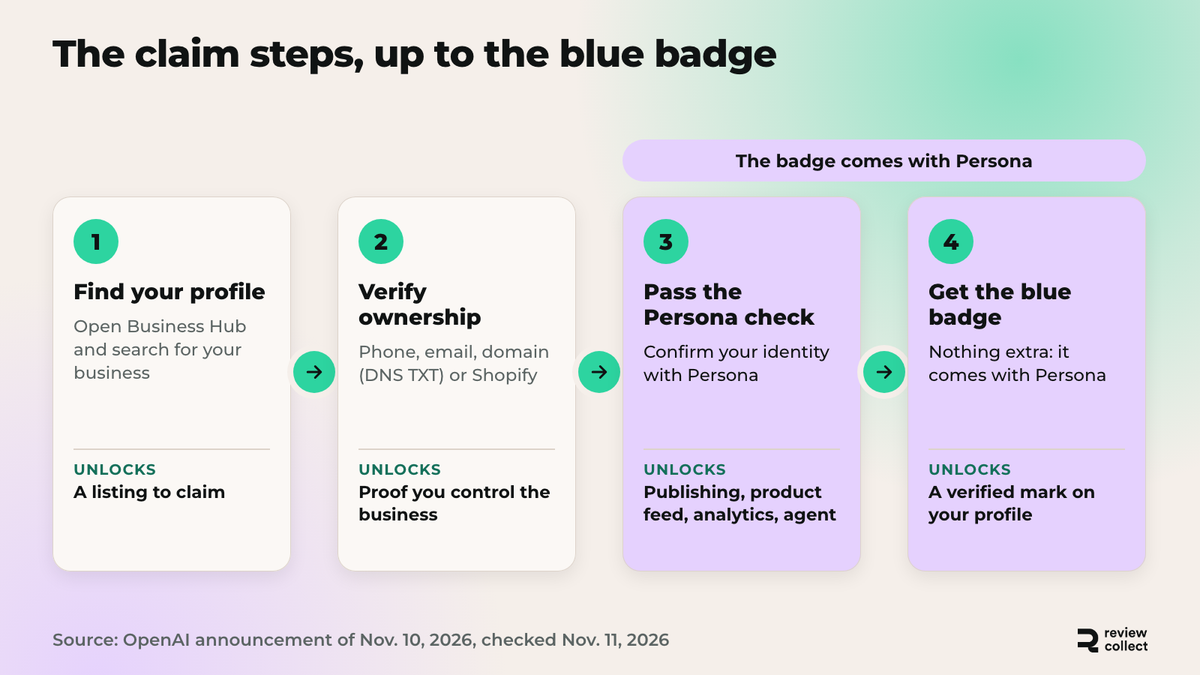
You claim your business by proving you own it, then passing an identity check before you publish anything. Verification runs through your business phone, business email, website domain or Shopify account. For the domain, you add a DNS TXT record, which is a line of text your web host or developer adds to your domain settings so OpenAI can see you control the site. OpenAI's help center, Setting up your business on ChatGPT, describes the setup.
Next, Persona, a third-party provider, checks your identity. It comes after ownership verification because OpenAI requires it before you can publish changes, connect a product feed, see analytics or create an agent: proving the business is yours opens the claim, and the identity check opens everything that changes or exposes the profile.
| Step | What you do | What it unlocks |
|---|---|---|
| 1. Find your profile | Open Business Hub and search for your business | A listing to claim |
| 2. Verify ownership | Use business phone, email, domain (DNS TXT record) or Shopify account | Proof you control the business |
| 3. Pass the Persona check | Confirm your identity with Persona | Publishing changes, product feed, analytics, agent creation |
| 4. Get the blue badge | Nothing extra: it comes with a successful Persona check | A visible verified mark on your profile |
Which verification method should you pick?
Pick the one you can finish today. Shopify merchants have the shortest path, since the account is already there. If you manage your own domain, the DNS TXT record is a copy and paste for whoever holds your domain settings, so ask them early. A shared inbox works for email only if you can open it.
What does claiming change?
Claiming gives you control over what ChatGPT says about your business and a way to see how people respond to it. It does not rank you higher, but it removes some risks.
You can correct information such as your description, links and business details instead of leaving ChatGPT to guess from scattered sources. A wrong opening hour or an outdated product line stays visible until someone fixes it, and now that someone can be you. That matters most for brands with several product lines, where small errors multiply. You also see the profile the way a buyer sees it.
The blue badge marks the profile as verified, which tells a reader the business behind it is real. Once you pass Persona, you can also see analytics, connect a product feed if you sell online, and create a Business Agent where you are eligible.
Product feed and Business Agent
A product feed is a file that lists your products with their details, so ChatGPT works from your catalog instead of from guesses. A Business Agent is an assistant tied to your business that answers buyers on your behalf. Both stay behind the Persona check, and the Business Agent is limited to eligible US ecommerce and online services with a website. Outside the US, expect the profile, the badge and the analytics first.
What you gain in practice
You gain accuracy, a verified mark and a first view of how ChatGPT shows your brand. Each is useful on its own. Accuracy alone justifies the time, because an error ChatGPT keeps repeating to buyers is worth fixing. None of them is a promise of more traffic.
What does claiming not change?
Claiming does not change your placement, your sales or ChatGPT's independence. OpenAI states that claiming a profile does not guarantee higher placement or sales, and that ChatGPT stays independent, which means claiming does not buy placement and ChatGPT keeps making its own recommendations. The badge is not an advertising slot, and a claimed profile is not a ranking boost.
So if someone sells you a "ChatGPT claiming service" for a monthly fee, remember that you can do the claim yourself with the steps above. Nobody can sell you a better placement, because OpenAI says the claim does not give one. At launch, the claim is free. OpenAI has not ruled out charging later, so the free status describes today, not a promise.
"Claiming does not guarantee higher placement or sales."
A paraphrase of OpenAI's stated position at launch, November 10, 2026.
What a claimed profile cannot fix
A claimed profile cannot fix a weak reputation. If your product pages are thin, your reviews are old and your rating sits at 3.2 stars, ChatGPT can still read that. The claim lets you correct facts. It does not rewrite what other people say about you.
Independence cuts both ways
Independence means you cannot buy or request a better answer through the profile. It cuts both ways: the same independence protects buyers, and it is why third-party proof matters: it is the part of your reputation you earn rather than declare.
Why work on your reviews and not only your profile?
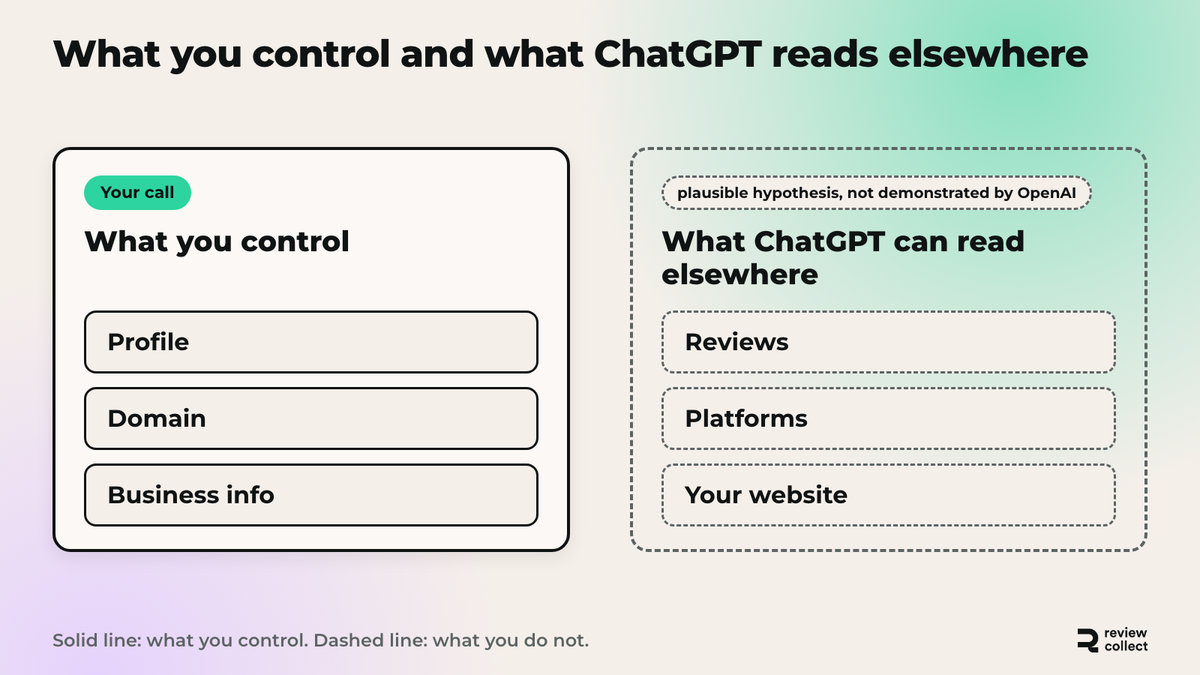
Because the profile and the reviews are two different things. The profile is what you control: you edit it once, and it holds what you say about your business. OpenAI does not publish how ChatGPT decides which businesses to recommend, so nobody outside the company can give you the rule, and we will not invent one.
What ChatGPT can read elsewhere is a hypothesis, not a finding. Reviews on Google, Trustpilot and your product pages are public, recent and written by buyers, and they grow every week, so it is plausible that AI systems read them. OpenAI has not demonstrated that a recent, consistent flow of reviews helps you get recommended.
What you can check yourself is the result. Ask ChatGPT the same questions about your brand before and after you work on reviews, then compare. If you wonder how to rank in ChatGPT or how to show up in ChatGPT answers, the profile is only the starting point, because it fixes facts but adds no proof. GEO means optimizing so AI answer engines cite you. Our article on whether you need a GEO tool concluded that good SEO and real customer reviews matter more than a dedicated GEO tool.
The button below is for readers who want to work on reviews. If you only needed the claim, you can skip it.



Work on what ChatGPT reads beyond your profile
Claiming is the first step, but your AI visibility is shaped by your reviews, platforms and website. See what actually counts.
- Collect reviews by email, SMS or WhatsApp, synced with delivery tracking
- Keep your reviews fresh and recent
- Get personalized replies to your reviews in 60 seconds
×30 reviews collected in the first month
How do you read your 28-day insights?
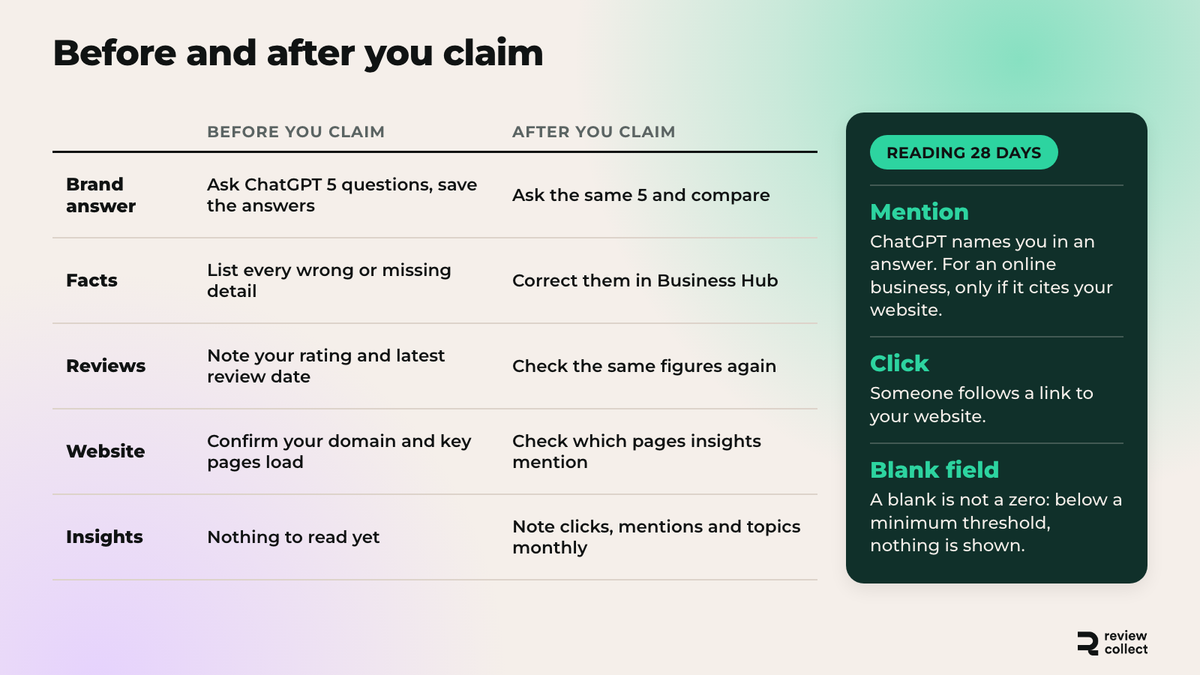
Your 28-day insights show how people reached and used your profile over the last 28 days, and you only see them after the Persona check. They cover website clicks, mentions and recurring topics. A mention means ChatGPT names you in an answer; for an online business it only counts if ChatGPT cites your website. A click means someone follows a link to your website. Recurring topics are the subjects that come up in answers about you. Think of them as a monthly report card on how visible your profile is, not as a sales dashboard.
Read them with three cautions. First, a click is not a visit: it records that someone tapped a link, not that the page loaded or that they bought. Second, metrics appear only above a minimum threshold, so a blank is not a zero. Third, OpenAI does not share the conversations behind the numbers, so you see totals, not the questions people asked. If a number looks low, check whether your website is clearly named and linked on your profile before you worry.
What to do with recurring topics
Recurring topics are the most useful line, because they tell you what people associate with your brand. If shipping delays or sizing keep coming up, check whether your recent reviews say the same thing. Match each topic to a page or a review theme, then note it in your tracking sheet.
Why 28 days is a small window
Twenty-eight days is one month of data, with no seasonality and, early on, a small count. Do not draw a trend from one reading. Compare month over month, and treat a single month as a baseline.
What should you check before and after you claim?
Check what ChatGPT says about your brand before you claim, then repeat the same check after, so you can see whether anything moved. Without that baseline, you will never know what the claim changed. If you want a deeper method, our guide to GEO for ecommerce explains how to test prompts.
| Before you claim | After you claim | |
|---|---|---|
| Brand answer | Ask ChatGPT 5 questions about your brand and save the answers | Ask the same 5 questions and compare |
| Facts | List every wrong or missing detail | Correct them in Business Hub |
| Reviews | Note your rating and the date of your latest review on each platform | Check the same figures again |
| Website | Confirm your domain and key pages load | Check which pages the insights mention |
| Insights | Nothing to read yet | Note clicks, mentions and topics each month |
A short 30-day plan
Days 1 to 3: do the claim and save your baseline answers, word for word, with the date. Days 4 to 10: correct the wrong facts you listed (description, links, business details), pick the review platforms you want to grow, and send your first review requests to recent customers. Days 11 to 28: keep the requests going every week, answer the new reviews, and read your first 28-day insights once they appear. Day 30: ask ChatGPT the same 5 questions again, compare the answers with your baseline, and note which wrong facts are now fixed and which are still repeated.
How does Review Collect help you get recommended by AI?
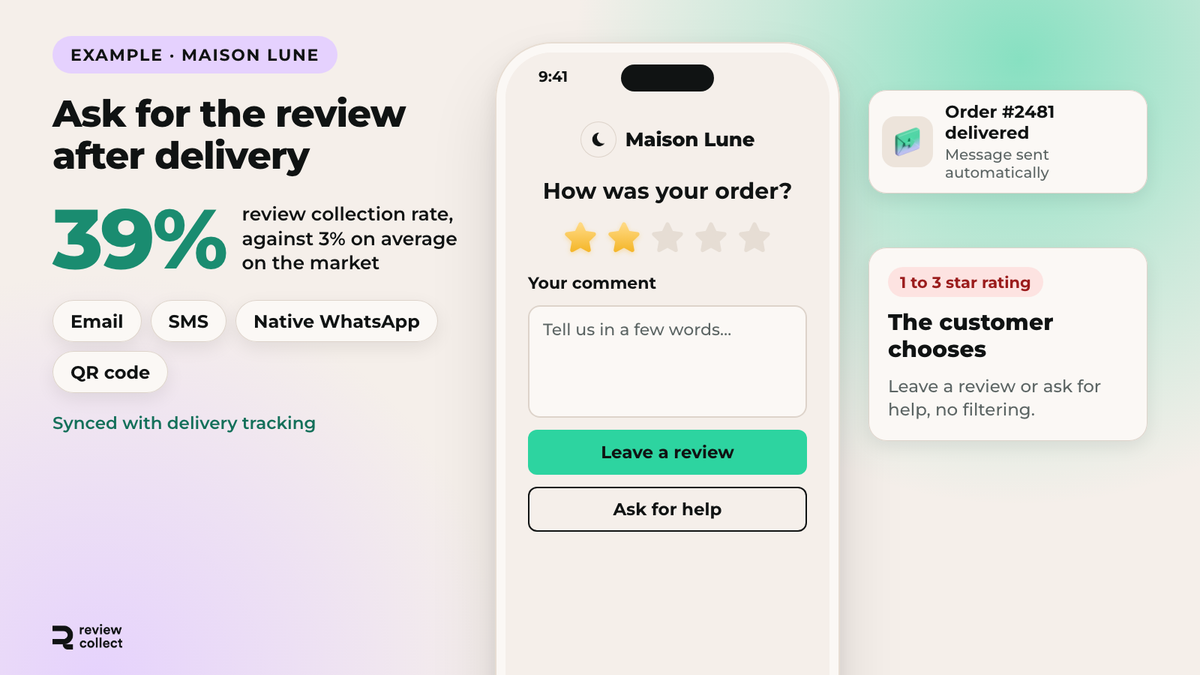
The claim stops at the profile; reviews are worked continuously. Here is how Review Collect does it. Review Collect helps by raising the volume and freshness of the reviews that public platforms show about your brand. We do not control how ChatGPT picks businesses, and we do not promise AI rankings. What we control is the flow of recent, first-hand reviews. Our review collection software collects reviews by email, SMS, WhatsApp and QR code, synced with delivery tracking, and sends happy customers to the platform you choose.
Review Collect's internal review collection rate is 39%, against 3% on average on the market. It measures how many customers leave a review, not how an AI assistant behaves.
To follow the other half, our AI perception tracking is the feature that shows what AI systems say about your brand, and follows it over time. That is the monthly check from the section above, without the spreadsheet.


Your next order deserves a review. We take care of it.
SMS and WhatsApp collection, mediation for unhappy customers, AI replies on every published review. Live in 48 hours, no developer needed.
Free demo×30 reviews in the first month · A personalized AI reply to every review
Frequently Asked Questions
Analyze with AI
Ask your questions about "How to Claim Your Business in ChatGPT (and What It Won't Do)" with your preferred AI

Growth Hacker
Your customers have reviews to give. We collect them for you.
20 minutes with a Review Collect expert. You leave with a concrete collection plan for your brand.